
I need tools for my personal life to manage tasks, ideas and writing. I’ve tried them all. Notion, Obsidian, Todoist, Evernote, Apple Notes, Roam, scattered Google Docs with names like “Ideas FINAL v3” At one point I had a tasks app, a notes app, a writing app, a read-later app, and a “thoughts” app, which is just a polite way of saying a junk drawer with a subscription fee.
Then I started using Workflowy for one thing, and it quietly ate everything else.
The pitch in ten seconds
Workflowy is an outliner. You get an infinite nested list. That’s it. No databases, no templates marketplace, no “second brain” philosophy requiring a PhD in library science to set up.
You open it. You type. You indent. You’re done.
It sounds too simple to work. That’s exactly why it works.
What I actually keep in it
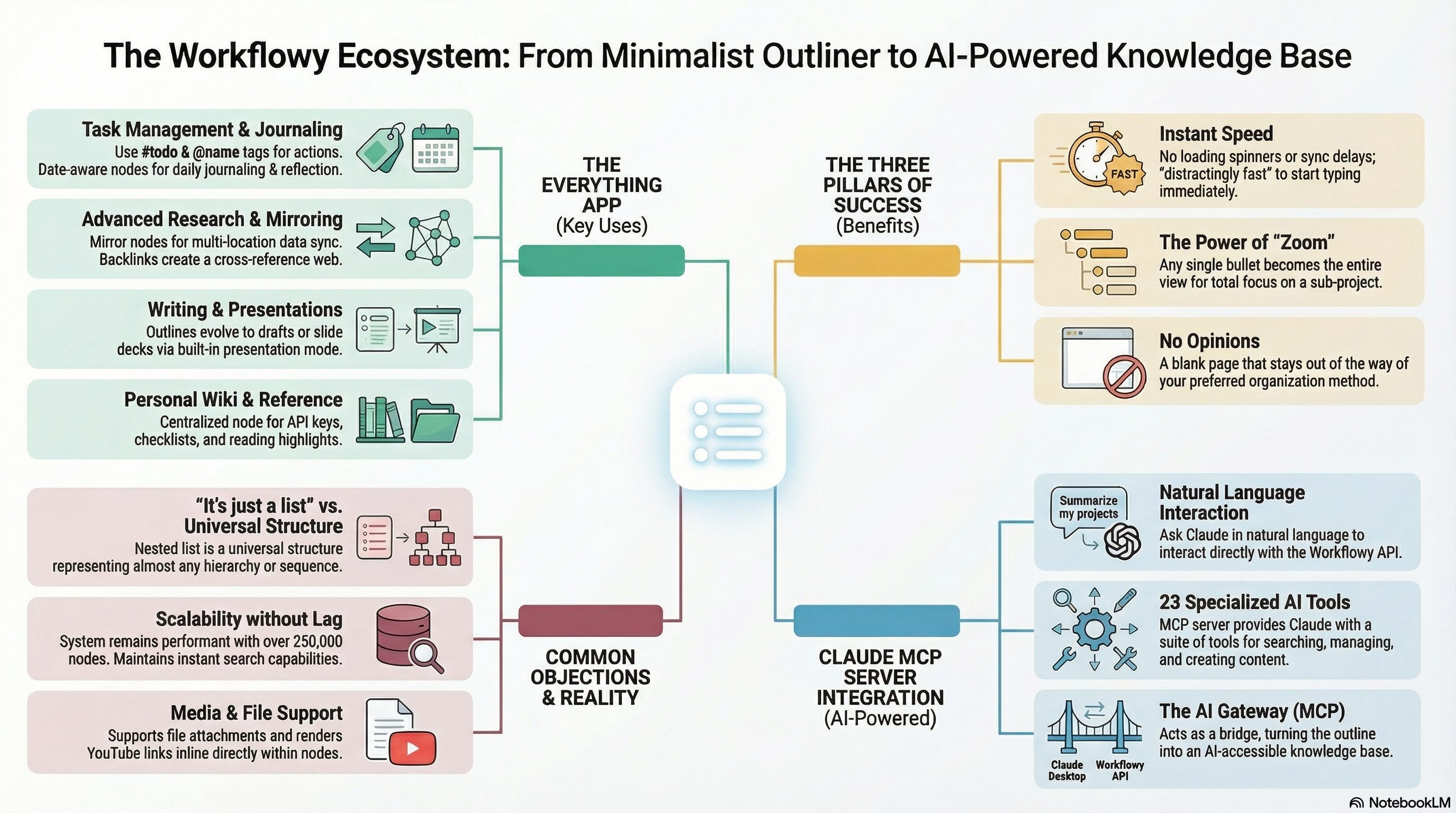
Tasks. Not via some bloated project management system; just bullets with #todo (and other tags) and @name tags to assign ownership. Workflowy has built-in task management, so when something’s done I mark it complete and it disappears from view. No ceremonies, no inbox-zero rituals, no weekly reviews that I definitely won’t do. Tag a person, tag a project, and the filters do the rest.
Meeting notes. Every meeting gets a bullet under the date in a journal node. Key points nest underneath. If something becomes a task, I tag it. The note and the action live in the same place, which means I actually find them again later.
Research. This is where Workflowy quietly punches well above its weight. When I’m working through a problem - a technology strategy, an architecture decision, a new framework I’m evaluating, and especially the articles for Substack - I think in outlines. Workflowy is an outline. There’s no friction between how I think and how the tool works. I dump, I rearrange, I nest, I collapse. The structure emerges as I go.
Two features make it especially good for research. First, mirror nodes : you can place a copy of any node in multiple locations and they stay perfectly synced. A finding that’s relevant to three different workstreams lives in all three, updated once. No copying, no staleness, no “which version is current?” anxiety. Second, Workflowy tracks backlinks : link to another node and it knows about the connection in both directions. Over time your research develops a web of cross-references that you didn’t have to manually maintain. It’s the connective tissue that turns a pile of notes into something you can actually navigate.
Writing. This article started as a Workflowy bullet. Most of my writing does. An outline is already a first draft if you squint. I expand bullets into paragraphs, rearrange sections by dragging them around, and export when it’s ready.
Reference material. API keys, account details, onboarding checklists, that one command I can never remember; all nested under a “Reference” node. It’s a personal wiki without any of the overhead of maintaining a personal wiki.
Reading notes. When I read something worth remembering, I drop a bullet with the title and nest my highlights and reactions underneath. Over time, this becomes a surprisingly useful personal library.
Journaling. Workflowy has genuinely good date awareness; type a date and it becomes a live, clickable reference. Combine that with tags and you get a powerful journaling system. Daily entries, weekly reflections, tagged by theme or mood, all searchable and all living alongside everything else. No separate app required.
Links. Lots of web links.
Kanban. And if you want a different view? Workflowy added a kanban-style board view, so any list can become a set of columns when that’s the better way to see things. The simplicity is still there, it’s just a list wearing a different tie.
Presentations. This one surprises people. Workflowy has a built-in presentation mode that turns any outline into a slide deck you can present directly from the app. Your outline is your talk structure, so there’s no exporting, no reformatting, no death-by-PowerPoint. I’ve used it for internal walkthroughs and it works remarkably well; you’re presenting your thinking in the same structure you used to develop it.
Why it sticks when others didn’t
Three reasons.
Speed. Workflowy is fast. Genuinely, distractingly fast. There’s no loading spinner, no sync delay, no “building your workspace” interstitial. You open it and you’re already typing. This matters more than any feature list, because the best productivity system is the one you actually open.
Zoom. Any bullet can become your entire view. Click into “Q2 Planning” and suddenly that’s your whole world - clean, focused, free of everything else. Click back out and it’s a bullet again. This is the single most underrated interaction pattern in productivity software. It means the same tool scales from a quick grocery list to a multi-year programme of work.
No opinions. Workflowy doesn’t care how you organise things. It doesn’t ship with six default views and a “getting started” tutorial that takes forty minutes. It’s a blank page that happens to support structure. You bring the system; it stays out of the way.
The objections I had (and why they faded)
“But it’s just a list.” Yes. And a spreadsheet is just a grid. The constraint is the point. A nested list is a universal data structure (you’ve heard of LISP, right?). Nearly everything you want to capture is either a sequence, a hierarchy, or both.
“What about files and media?” Workflowy lets you attach files directly - either as links or uploaded into the node itself. Drop a YouTube link and it renders inline. It’s not trying to be Google Drive, but it handles media and attachments better than you’d expect from something that looks this minimal.
“It won’t scale.” I have over 250,000 nodes in Workflowy spanning several years. No noticeable performance decrease. Search is instant. Tagging and filtering work. It scales better than most tools I’ve used precisely because the underlying model is so simple.
Give Claude Access to Your Workflowy
I built an MCP server that lets Claude read, search, and write to your Workflowy outline. It turns your Workflowy into an AI-accessible knowledge base - you just talk to Claude naturally and it handles the rest.
What it does
You say things like:
“What’s overdue in my Tasks?”
“Add a task under Office: Review Q2 budget”
“Search my notes for anything tagged #review”
“Give me a daily standup from my Projects”
“Whats been on my reading list for a long time?”
Claude calls the right Workflowy tools behind the scenes - searching nodes, creating tasks, checking due dates, summarising projects. 23 tools in total, covering search, content creation, todo management, and project overview.
How it works
The server sits between Claude Desktop and the Workflowy API. It speaks MCP (Model Context Protocol), which is how Claude Desktop connects to external tools. You install it once, point Claude Desktop at it, and every conversation gets access to your Workflowy tree (recursively, if you have lots of nodes like I do).
Other Hacks
I also use it to synch notes made on my ReMarkable to the Workflowy node for that day. But that’s another story and another MCP server.
A word on placement. This is an interlude rather than a phase article. The series it sits inside runs four phases; Learning, Deciding, Building and Transforming, asking in turn whether an organisation can perceive its own situation, describe and design under constraint, build an effective response, and take a position on what the change was for. Tooling belongs to none of them and touches all four, which is roughly why it gets an interlude. From Learning to Clarity resumes the sequence.
Go Here if You’re Interested
github.com/dromologue/workflowyMCP
(If this confuses you, you can either find a friendly engineer OR just point Claude at the repo and it will install it for you.)
PS.1… I do not and never have worked for or with Workflowy the company. I’m just a fan.
PS.2 … Other LLM clients are available, Like ChatGPT, CoPilot etc. It doesn’t have to be Claude, it’s just what I use.